KRELEN / MARKETPLACE OPERATIONSCOMMERCE, UNDER CONTROL. Trial currently unavailable · account creation does not activate it
Live inventory sync across your marketplaces.
Keep stock aligned, then manage your orders from one workspace.
Shared inventory · Listing targets
| Select | Item / listing | Krelen stock | Publish quantity | Status | Action |
|---|---|---|---|---|---|
| KRL-001 Noon · Commerce pack · Noon | 10 | 10 | DisabledPublication unavailable | DetailsSource: WH | |
| KRL-001 Jumia · Commerce pack · Jumia | 10 | 10 | DisabledPublication unavailable | DetailsSource: WH | |
| KRL-001 Amazon · Commerce pack · Amazon | 10 | 10 | DisabledPublication unavailable | DetailsSource: WH |
One stock source. Noon, Jumia and Amazon listing targets.



YOUR INVENTORY, AT THE CENTER
The same Krelen workspace connects stock and listing quantities.
One inventory · A clearer operationLive inventory sync across your marketplaces.
Krelen stock changes first. Marketplace quantities follow.
Order received · Krelen updated
Noon synchronized
Jumia synchronized
Amazon synchronized
Inventory synchronized
01 / 06Shared stock, ready
Order received−1
KRELEN INVENTORY10Shared available stock
| Select | Item / listing | Krelen stock | Publish quantity | Status | Action |
|---|---|---|---|---|---|
| KRL-001 Noon · Commerce pack · Noon | 10 | 10 | DisabledPublication unavailable | DetailsSource: WH | |
| KRL-001 Jumia · Commerce pack · Jumia | 10 | 10 | DisabledPublication unavailable | DetailsSource: WH | |
| KRL-001 Amazon · Commerce pack · Amazon | 10 | 10 | DisabledPublication unavailable | DetailsSource: WH |
Before the order · shared stock 10
Less switching. One operational workspace.
Marketplace orders in a shared operational view.
01Orders
02Orders
03Orders
ONE OPERATIONAL WORKSPACE
Review. Prepare. Resolve.
A shared view for the next operational action.
Less switching. More operating.
Bring the work into one operational workspace.
Before
Seller Portal ASeller Portal BSeller Portal CExcelManual quantity updatesAfter / Krelen
OrdersInventoryPricingSettlements
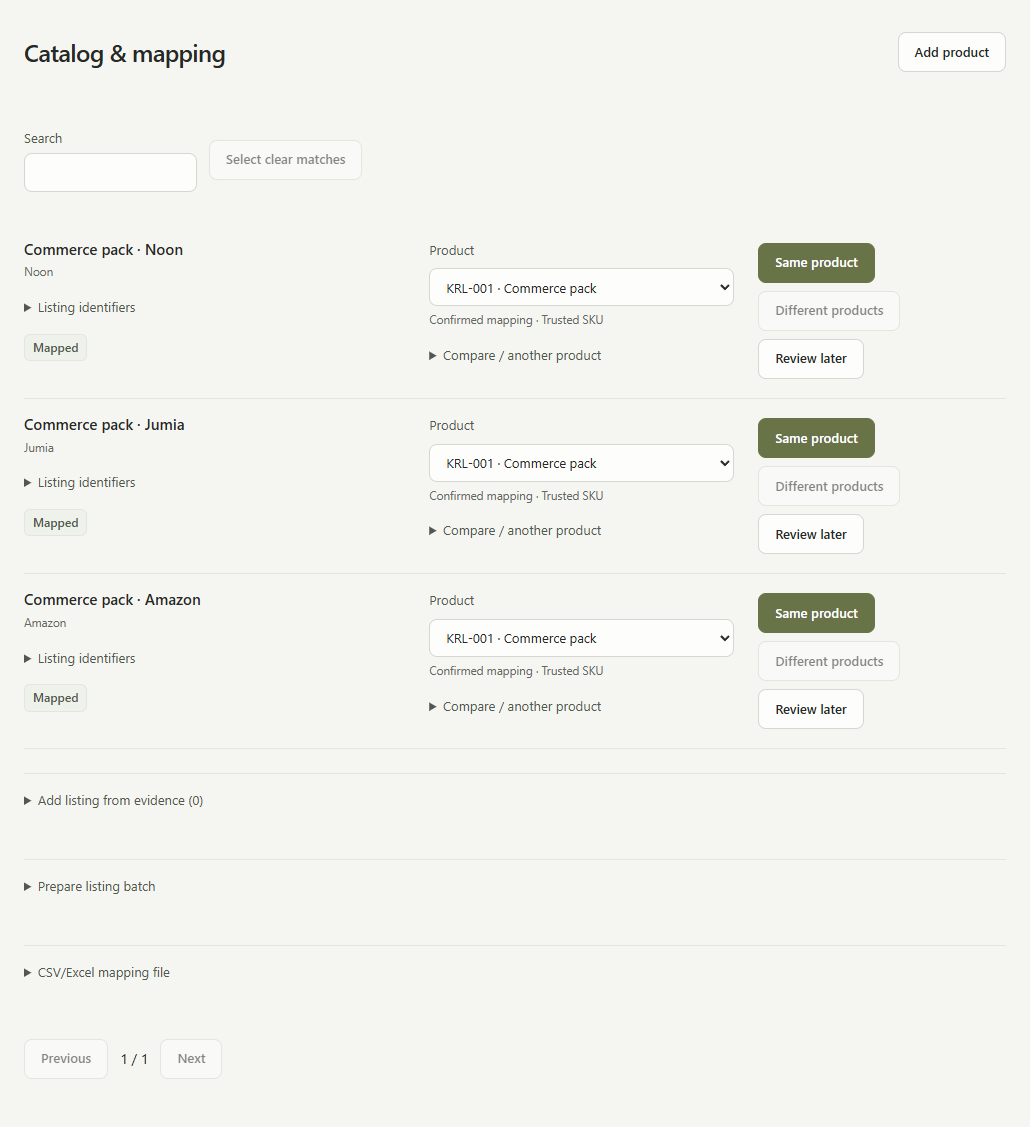
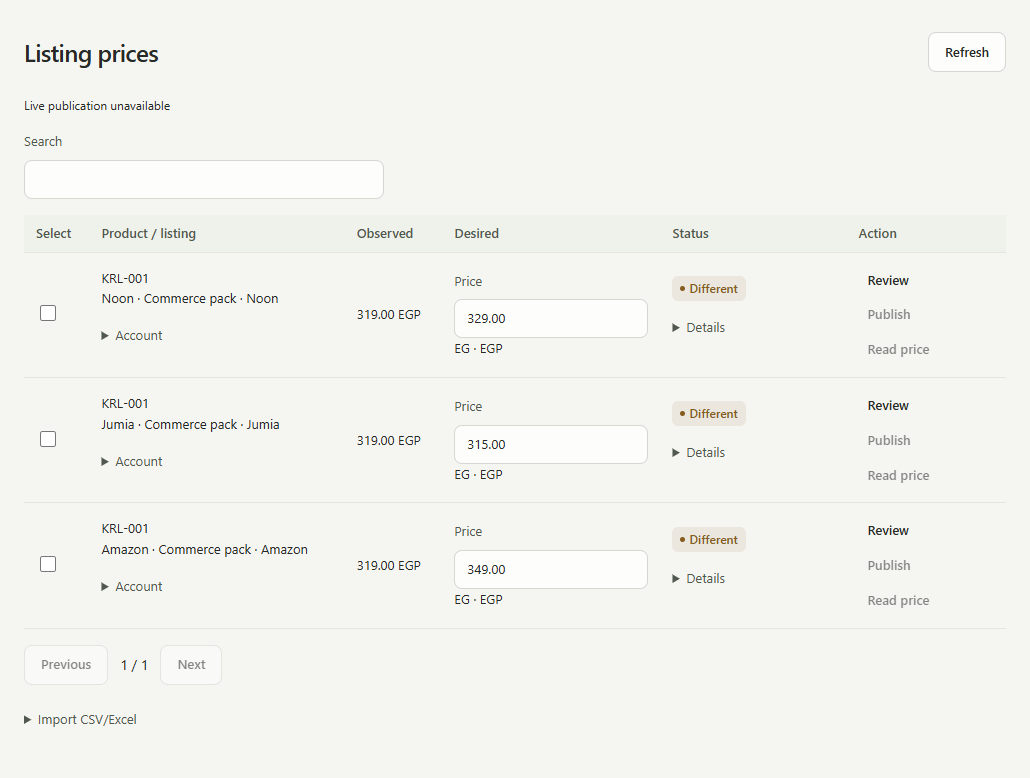
From your catalog to every marketplace listing.
One item. Mapped listings. Prices set for each marketplace.
- 01
Catalog
Start with your item
- 02
Map listings
Connect each marketplace listing
- 03
Set marketplace pricing
Manage each listing’s price
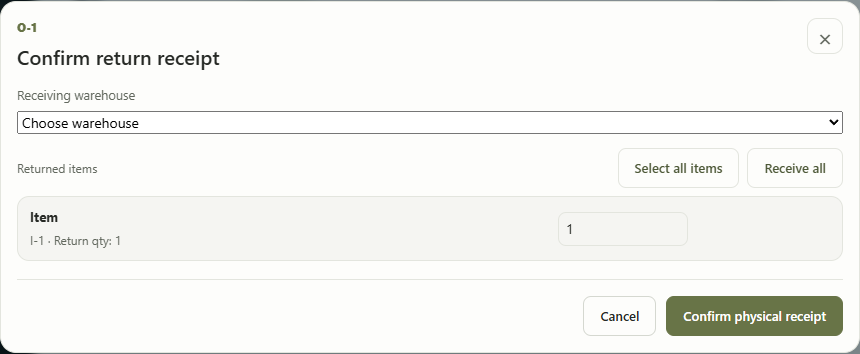
Handle returns without losing track of stock or money.
Confirm what came back. Track the financial refund separately.
Return received
Record received items and the receiving warehouse. Stock handling follows the confirmed receipt.
Track the refund
Follow the refund in financial evidence. A refund alone does not confirm stock has returned.

See what changed. Know what needs attention.
Financial and inventory reports, connected to your operational evidence.
- What sold?
- What needs attention?
- What changed in inventory?
- What did the marketplaces pay?
- Where are the differences?
ILLUSTRATIVE DEMO · SAMPLE DATA
September 2026Sales & marketplace performance
What sold · by marketplace
Noon160 orders78,400 EGP
Jumia96 orders47,040 EGP
Amazon64 orders31,360 EGP
Stock movement
- Received
- 96
- Fulfilled
- 388
- Physically returned
- 12
- Net stock change
- −280 units
Payouts · needs attention
- Expected
- 132,500
- Received
- 131,250
- Difference to review
- 1,250 EGP
Made for a connected commerce landscape.
Marketplace operations, with one clear point of control.






Understand what your marketplace paid.
Follow sales through deductions to the expected payout, then see the difference.
Sales20,000 EGP
Refunds1,000 EGP
Fees2,000 EGP
Shipping500 EGP
Expected payout16,500 EGP
Actual payout16,250 EGP
Difference250 EGP
Bring your operation together.
21 days to explore Krelen. No card initially.